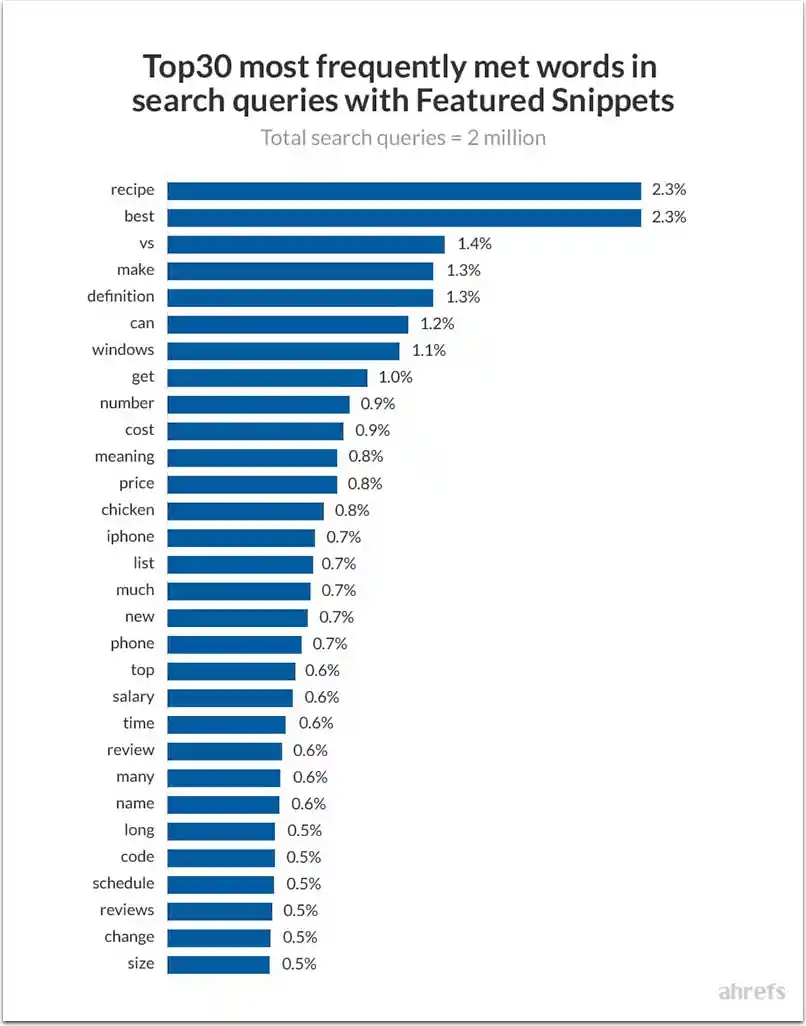
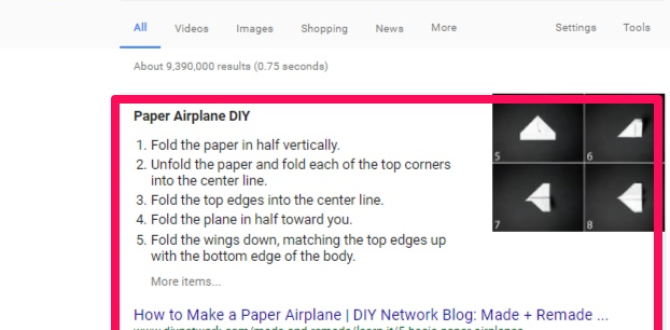
To rank for featured snippets, find questions where you already rank on page one, put each question in a heading, and answer it directly in 40–60 words right below it, using lists for steps and tables for comparisons. Below are 9 practical tips to win featured snippets and optimise your content for Google’s answer boxes and AI answers.
Key takeaways
- Target questions you already rank for on page one.
- Answer in 40–60 words directly under a matching heading.
- Use numbered lists for steps and tables for comparisons.
- Track snippet wins in Search Console and refresh content regularly.
What Is a Google Featured Snippet?
A featured snippet is the answer box Google shows above the regular results. It pulls a short paragraph, list, table or video from one web page that answers the searcher’s question directly, and links to that page.
A featured snippet takes the most visible spot on the results page, above the regular blue links, and on mobile it can fill most of the screen. The same short, well-structured answers are also the kind of content that AI Overviews and voice assistants tend to draw on, so writing for snippets helps you across answer engines, not just in one box.
In practice, Google almost always takes featured snippets from pages that already rank on the first page for that search. So the fastest route to a snippet is usually not a new page. It is improving a page that already ranks in positions 2–10 so that it answers the question more clearly than the current snippet.
What Are the Types of Featured Snippets?
Featured snippets come in four main formats:
- Paragraph: a short definition or direct answer, usually 40–60 words.
- List: numbered steps or bulleted items, common for “how to” and “best” searches.
- Table: comparisons, prices, specifications or timelines.
- Video: a YouTube clip, often starting at the moment that answers the question.
Match the format to the question. “What is” searches usually show a paragraph, “how to” searches show a numbered list, and “vs” or “cost of” searches often show a table. Search your target question first and use the format Google already shows.
Tip #1: Start with queries you already rank for
Open the Performance report in Google Search Console, filter for queries that contain words like what, how, why, best, cost or vs, and sort by impressions. Questions where your page already sits in positions 2–10 are your best snippet opportunities, because Google already considers the page relevant.
For each opportunity, search the query yourself and note whether a snippet appears, which site holds it and what format it uses. A vague paragraph you can beat with a clearer answer is a quicker win than a detailed table.
Tip #2: Collect questions from People Also Ask
The People Also Ask box and Google’s autocomplete suggestions show the exact questions searchers type. Each one is a potential snippet and a ready-made heading for your page.
Collect the questions that match your page’s topic and group close variations together. For a page about local SEO, that might be “what is local SEO”, “how long does local SEO take” and “how much does local SEO cost”.
Tip #3: Use the exact question as a heading
Put each question in an H2 or H3 using the searcher’s own wording. Clear question headings help Google match a section of your page to a query, and they make long pages easier for readers to scan.
Tip #4: Answer in 40–60 words first
Directly under the heading, answer the question in one short paragraph of about 40–60 words. Lead with the answer itself (“Local SEO usually takes three to six months to show strong results…”) rather than background, then add detail, examples and exceptions in the paragraphs that follow.
Tip #5: Use lists for steps and tables for comparisons
When the answer is a process, use a numbered list with one action per step. When it compares options, prices or features, use a simple HTML table with clear column headers. Google can lift these formats almost unchanged into a snippet.
Tip #6: Define terms in one clear sentence
For “what is” queries, use the pattern “[Term] is a [category] that [what it does].” For example: “A featured snippet is a highlighted answer that Google shows above the regular search results.” One precise sentence is far easier to quote than a paragraph of context.
Tip #7: Answer the follow-up questions
Pages that cover the related questions around a topic often win several snippets at once. After your main answer, add short sections or an FAQ for the next questions a reader is likely to ask, each with its own concise answer.
Tip #8: Keep the page technically clean
Make sure the page is indexable, loads quickly on mobile and uses real HTML headings, lists and tables. Text placed inside images or loaded by complex scripts is hard for Google to read and quote.
Tip #9: Add a video for how-to topics
For practical “how to” searches, Google sometimes shows a video snippet. A short YouTube video with a clear title, chapters and a description that answers the question gives you a second way to appear for the same search.
How Do You Optimize Content for Featured Snippets?
Optimising for featured snippets comes down to three things: answering the right question, formatting the answer so Google can lift it, and keeping the page trustworthy and current. Google explains how it selects snippets in Featured snippets and your website. The checklist below puts that into practice.
1. Match the Search Intent
- Answer the question that was asked: if someone searches “how long does SEO take”, give a timeframe, not a history of SEO.
- Write for people first: follow Google’s guidance on helpful, people-first content.
- Show real experience: add examples from your own work, screenshots or results where you have them.
2. Structure the Page for Extraction
- One question per heading: use H2s and H3s that mirror real searches.
- Answer first, detail second: put the 40–60 word answer directly under the heading.
- Short paragraphs: two or three sentences each.
- Real HTML lists and tables: not images of text.
3. Write Answers Google Can Quote
- Keep it self-contained: the answer should make sense on its own, without the rest of the page.
- Reuse the question’s wording: it confirms the match for Google and for readers.
- Use a neutral, factual tone: state the answer plainly.
- Be specific: include accurate numbers, timeframes or steps where they apply.
4. Win and Keep the Snippet
- Copy the current format: if Google shows a list, answer with a list.
- Beat the current answer: be clearer, more complete or more up to date than the page that holds the snippet now.
- Add an FAQ section: to capture related questions on the same page.
- Refresh regularly: snippets change hands, so review your key pages every few months.
5. Measure the Results
- Compare before and after: track impressions, clicks and CTR for the target queries in Search Console.
- Give it a few weeks: Google needs to recrawl the page before changes show.
- Watch AI Overviews too: clear, well-structured answers are more likely to be cited there.
A real example from this page: in our own Search Console, this guide averaged position 4.8 for “9 tips for ranking in google’s featured snippets” between August and November 2026, earning 19 clicks from 288 impressions. That is a 6.6% click-through rate, more than five times the roughly 1.2% average across webdoux.com, which shows how much a clear, question-matched answer can lift clicks.
Conclusion
Featured snippets and AI answers both reward pages that answer questions clearly. Find questions you already rank for, answer each one in 40–60 words under a matching heading, use lists and tables where they fit, and track the results in Search Console. Related guides: best SEO company in Chennai, local SEO services in India, digital marketing keywords.
Start with three to five questions your pages already rank for, rewrite those sections using the tips above, and check Search Console after a few weeks. Small, focused improvements to pages that already rank usually win snippets faster than publishing new content.
Want help finding snippet opportunities across your site? Our team can review your Search Console data and rewrite your key pages. Talk to Webdoux or see our SEO services in Chennai.
Have a question about featured snippets or AI answers? Ask our SEO team.
Last updated: November 2026.